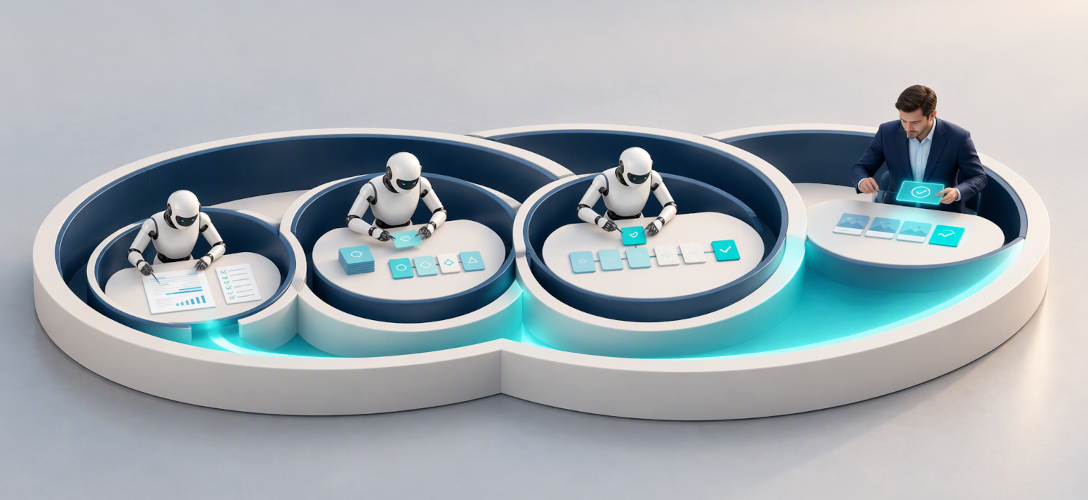
F.L.O.W. Framework: 4-Step to Design AI Agents That Don't Break the Bank
F.L.O.W. Framework: 4-Step to Design AI Agents That Don't Break the Bank
The AI agent gold rush has a bill attached
and most leadership teams never read it before signing.
Enterprise spending on agentic AI is exploding. The market is projected to grow from $7 billion in 2025 to over $93 billion by 2032 . Every board deck now features “AI agents” on page one. Every vendor promises transformation.
But inside the engine room, a quieter story unfolds. Production-grade autonomous platforms start at $450,000 and routinely exceed $1.5 million. Hidden costs — token consumption, model drift, non-deterministic testing — push budgets 35–50% above initial estimates. At enterprise scale, LLM inference alone runs $5,000 to $25,000 per month. Recurring. Forever.
The question is no longer whether to deploy AI agents. It is whether you can afford how you are deploying them.
The Cost of Getting It Wrong
Here is the math that should worry every executive: an autonomous agent running 10–30 reasoning steps costs between $0.10 and $1.00 per request. A deterministic workflow doing the same job costs about $0.01 . That is a 100x difference — for identical output.
Reliability makes it worse. Even at 99% per-step reliability, a 10-step autonomous chain succeeds only 90% of the time . You pay more. You get less certainty. And the variance arrives at month-end, in the token bill.
The root cause is not the technology. It is the sequence. Most teams skip discovery, jump straight to building agents, and learn — months later — that half their tasks never needed autonomy at all. Token usage multiplies across agent conversations, context windows balloon, and production bills land 10x higher than projected .
Complexity = Chaos + Cost
AI amplifies all three
The fix is not a better model. It is a better process. A repeatable method that starts with the human, invests in discovery where it matters, and converts expensive exploration into affordable execution.
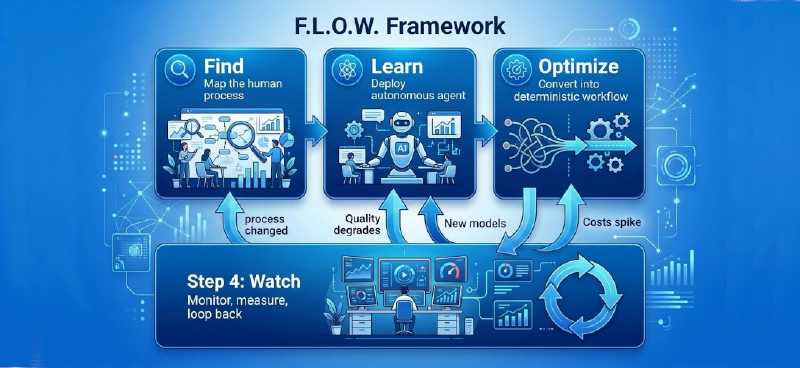
We call it F.L.O.W. — Find, Learn, Optimize, Watch. Four steps that take you from human process discovery to production agents that are fast, cheap, and reliable.
Let’s walk through each one.
Step 1: Find — Discover the Human Process
Before you automate anything, understand what humans actually do. Not what the org chart says. Not what the process document claims. What people really do, every day, with every exception and workaround included.
This is the step most teams skip. They buy the tool first, then hunt for a problem it can solve. Six months later, they have a pilot nobody uses and a budget nobody can explain.
Map the process
Shadow the people doing the work. Watch them receive an input, consult sources, apply judgment, handle edge cases, and deliver output. Write down every step — including the ones they say are “obvious” or “just how we do it.” Those invisible steps are exactly where automation succeeds or fails.
You will discover something surprising: the documented process and the real process are two different things. The gap between them is where AI projects die. A process mapped on paper looks clean and linear. The same process in practice involves three people, two spreadsheets, a phone call, and an unwritten rule that only one senior team member knows.
Classify every task
Once the map is complete, sort each step into one of three buckets:
- Deterministic — Same input, same output, every time. These are workflow candidates. No agent needed.
- Conditional — Rules exist, but they branch. These need routing logic, not autonomous reasoning.
- Open-ended — The path depends on what you find along the way. These genuinely need an agent.
This classification is where cost control begins. A deterministic task automated by an autonomous agent burns 10x–100x more budget than a simple workflow — for zero additional value.
Most teams discover that 70–80% of their process is deterministic. They never needed an agent. They needed a workflow with clear rules. That single realization can cut the AI budget in half before the first line of code is written.
Plan the cost structure
With tasks classified, estimate the cost of each automation path. How many LLM calls will this task require? Can a cheaper model handle the routine steps? What is the monthly token projection at production scale?
These questions feel premature. They are not. They are the difference between an AI initiative that scales and one that stalls when the CFO sees the first quarterly bill.
The output of Step 1 is a process map with every task classified by complexity, automation approach, and estimated cost. You now know, before spending a dollar on development, which parts of your operation need agents, which need workflows, and which should stay human.
One more classification matters before you build: where does your data go? Every process step involves information. The F.L.O.W. framework assumes deployment inside your own infrastructure. No client documents passed to third-party model providers. No confidential data leaving your environment to train someone else’s AI. Discovery done right means your compliance officer is in the room from Step 1, not blocking you in Step 4.
Step 2: Learn — Autonomous Agent to Explore
For the open-ended tasks identified in Step 1, you now deploy an autonomous agent. Give it a goal, a set of tools, and the freedom to figure out the best path. Then let it run.
This step is intentionally expensive. You are paying for discovery — and that is exactly the right investment at this stage.
Why autonomy matters here
Some tasks genuinely require exploration. The agent does not know the optimal sequence in advance. It needs to reason, consult sources, evaluate results, and adjust its approach in real time, each decision depends on what it discovers at the previous step .
Consider a due diligence process at a professional services firm. The agent must decide which document repositories to search, which precedents are relevant, which jurisdiction’s rules apply, and when a finding is material enough to escalate. The value is not in following a script. It is in finding the path nobody had written down.
No amount of pre-planning in Step 1 could have mapped this path. The agent finds it by trying, failing, and trying again.
The bill arrives — and that is expected
Autonomous agents run 5 to 30 LLM calls per task. Context windows balloon as the agent accumulates history. Token costs multiply across reasoning cycles. What looks efficient in a demo becomes a budget line that grows 10x in production.
This is not a bug. It is the cost of learning. The agent is doing work that no human documented, no flowchart captured, and no workflow template anticipated. The question is not whether this step is expensive. It is whether the knowledge it generates is worth the price.
Capture everything
The critical output of Step 2 is not the task result. It is the execution trace, a record of every action taken, every tool called, and every decision made.
This trace is your blueprint for Step 3. It shows you exactly which paths the agent found most effective, which steps were redundant, and where the reasoning loop burned tokens without adding value. Without this trace, you have an expensive black box. With it, you have a documented process ready to be optimized.
Know when to stop
The most common mistake in Step 2 is letting the agent run too long. Exploration has diminishing returns. Once the agent consistently finds the same optimal path — and the marginal improvement per run approaches zero — you have learned enough.
The output of Step 2 is a sucessful execution. You now hold the blueprint for a faster, cheaper, deterministic version of the same process.
Step 3: Optimize — Cost-Efficient Workflow Agent
The autonomous agent found the path. Now you harden it.
Take the execution trace from Step 2 and extract the successful pattern — the sequence of steps, tool calls, and decisions that consistently produced the right result. Rebuild that pattern as a deterministic workflow. Same output, fraction of the cost.
The 10x–100x transformation
Here is what changes when you move from autonomous exploration to optimized workflow:
| Dimension | Step 2: Autonomous Agent | Step 3: Workflow Agent |
|---|---|---|
| LLM calls per task | 10–30 | 3–5 |
| Cost per request | $0.10–$1.00 | $0.01–$0.03 |
| Predictability | Variable | Fixed |
| Debuggability | Trace required | Code path explicit |
| Reliability at 10 steps | ~90% | ~99%+ |
The cost reduction alone — up to 100x per request — justifies the entire F.L.O.W. framework. But the operational gains compound: fixed token budgets make CFO forecasting possible. Explicit code paths make debugging straightforward. Deterministic routing makes compliance audits simple.
What optimization looks like
Strip the reasoning loop. The agent already discovered the path. The workflow does not need to rediscover it. Replace “Let me think about what to do next” with “If X, do Y.”
Right-size the model. Not every step needs a frontier model. Route routine extraction and classification to cheaper models. Reserve premium reasoning for the one or two steps that genuinely require it. Most of your token spend goes toward tasks a smaller model handles perfectly.
Cache aggressively. If the agent repeatedly queried the same data during exploration, cache the result. Do not pay for the same API call twice.
Set hard limits. Token quotas per task. Maximum retry counts. Timeout thresholds. These guardrails prevent the workflow from drifting back into expensive, open-ended behavior.
The reliability dividend
Deterministic workflows are testable. Every path can be validated before deployment. Every failure can be traced to a specific code branch. This is not just an engineering convenience — it is an operational requirement for any function where errors compound or compliance matters.
The output of Step 3 is a production-ready workflow agent that delivers the same result as the autonomous agent — at 1/10th to 1/100th the cost, with predictable latency, fixed budgets, and full auditability. The agent taught you the path. The workflow owns it.
Step 4: Watch — Continuously Improve
The workflow agent is live. Costs are predictable. Output is consistent. The temptation is to declare victory and move on.
Do not.
Models drift. Processes evolve. Edge cases surface that the workflow was never designed to handle. Without a feedback loop, the efficiency you built in Step 3 erodes quietly — until quality drops, costs spike, or a failure forces the issue.
What to watch
Four signals tell you when to loop back:
- Cost. Is it staying within the range you projected in Step 1? A slow creep in token consumption often signals that the workflow is handling edge cases the original design did not anticipate.
- Output quality. Model providers update their systems. Behavior that was reliable in month one can degrade by month four. Prompt re-engineering and performance recalibration are ongoing operational costs — not one-time fixes.
- Failure patterns. Are the same exceptions recurring? A workflow that handles 95% of cases but fails on the same 5% every time is not finished. It is telling you where to optimize next.
- Process drift. The humans you shadowed in Step 1 have changed how they work. New tools arrived. Regulations shifted. The workflow is automating a process that no longer exists.
The loop back
Watching is not passive. It is a decision system. Each signal maps to a specific action:
flowchart LR
S1["Step 1: Find — map the human workflow and classify tasks"] --> S2["Step 2: Learn — deploy an autonomous agent and capture the execution trace"]
S2 --> S3["Step 3: Optimize — build a deterministic workflow and reduce cost and variability"]
S3 --> S4["Step 4: Watch — monitor cost, quality, failures, and process drift"]
S4 --> A["Costs spike unexpectedly"]
A --> C["Tighten the workflow, re-evaluate model selection, and add caching"]
C --> S3
S4 --> D["Quality degrades over time"]
D --> F["Redeploy an autonomous agent to re-explore the task with current tools"]
F --> S2
S4 --> G["The process itself has changed"]
G --> I["Re-map the human workflow and reclassify tasks"]
I --> S1
S4 --> J["New models or tools emerge"]
J --> K["Test whether the new capability justifies re-exploration"]
K --> S2
- Costs spike: return to Step 3 to optimize the workflow.
- Quality degrades or new capabilities emerge: return to Step 2 to re-explore the task.
- The process changes: return to Step 1 to map and classify the updated workflow.
The compounding advantage
Most organizations treat AI deployment as a project with a start and an end. The organizations that pull ahead treat it as a system with a loop. Every cycle through F.L.O.W. makes the process faster, cheaper, and more reliable. The first pass might reduce costs by 10x. The third pass — informed by production data and refined through repetition — often finds another 2–3x on top of that.
The competitive gap is not between companies that use AI and companies that do not. It is between companies that improve their AI continuously and companies that let it stagnate after launch.
The output of Step 4 is not a deliverable. It is a discipline, a system that ensures the efficiency you built today does not become the inefficiency you tolerate tomorrow.
Execution Beats Intention
Every organization has AI ambition. Few have AI discipline.
The F.L.O.W. framework is not a theory. It is a sequence of decisions — each one grounded in data, each one designed to prevent the cost explosions and reliability failures that turn promising pilots into expensive lessons.
| Step | What You Do | What You Prevent |
|---|---|---|
| Find | Map the human process. Classify every task. | Automating the wrong thing |
| Learn | Deploy an agent to explore. Capture the trace. | Guessing at the solution |
| Optimize | Convert the trace into a workflow. Cut costs 10x–100x. | Bleeding budget in production |
| Watch | Monitor, measure, loop back when signals change. | Slow degradation into obsolescence |
The pattern is simple. Start with the human. Invest in discovery where it matters. Codify what you learn into something affordable. Then keep improving.
The real bottleneck is not technology
Most AI initiatives stall because teams treat agent design as a technology problem. It is not. It is a process design problem with an AI solution. The teams that succeed are not the ones with the biggest models or the largest budgets. They are the ones that mapped their processes first, classified tasks honestly, and resisted the urge to deploy autonomy where a workflow would do.
Start this week
Pick one process. Any process. Shadow the person doing it. Document every step, every decision, every exception. Classify each task as deterministic, conditional, or open-ended. You will learn more about your AI readiness in that single exercise than in a dozen vendor demos.
The era of AI experimentation is over. The era of AI execution has begun. The question is no longer whether AI agents belong in your organization. It is whether you have the discipline to build them right.
Find. Learn. Optimize. Watch. That is how you turn AI uncertainty into reliable, daily competitive advantage.
Start with One Process
The F.L.O.W. Workshop is a half-day working session, not a sales pitch. Bring the people who know one process inside-out: the operations lead, the senior practitioner, the person everyone calls when the exception hits. We map the real workflow, classify every task, estimate the cost of each automation path, and identify where an agent pays for itself and where a simple workflow does the job.
You leave with three concrete deliverables:
- A documented process map — the real one, not the org chart version
- A classified task inventory — deterministic, conditional, and open-ended, with cost projections for each
- A Step 2 business case — if an open-ended task justifies autonomous exploration, you’ll know the expected cost and the expected return before you commit
Run it inside your infrastructure, under your confidentiality rules. Your data never leaves your environment.
FAQ: Executive Questions on AI Agent Strategy
Q1: Why are enterprise AI agents so expensive to run? A: Autonomous AI agents are expensive because they decide their own execution path at runtime, consuming 10–30 LLM calls per task versus 3–5 for a deterministic workflow. Each reasoning cycle, tool call, and memory retrieval adds to the token bill. At enterprise scale, LLM inference alone runs $5,000 to $25,000 per month, and hidden costs — model drift, non-deterministic testing, integration complexity — routinely push project budgets 35–50% above initial estimates. The solution is not a cheaper model, but a structured process like System in Motion’s F.L.O.W. framework that converts expensive autonomous exploration into affordable, deterministic workflows.
Q2: What is the difference between an AI agent and an AI workflow? A: An AI agent decides what to do next at runtime — the model chooses the execution path. An AI workflow follows predefined code paths — the developer decides the sequence in advance, and the AI handles reasoning within each step. The practical difference is cost and predictability: a workflow costs roughly $0.01 per request with a fixed budget, while a complex agent costs $0.10–$1.00 per request with unpredictable variance. Most production systems should default to workflows and reserve agents for tasks where the path genuinely cannot be known in advance.
Q3: When should a company use an autonomous agent instead of a workflow? A: Use an autonomous agent only when the next step depends on what the AI discovers during execution — tasks like open-ended research, debugging, or due diligence where no flowchart can be drawn in advance. Use a workflow when the steps are known, repeatable, and low-ambiguity. A simple decision test: if you can draw the flowchart before the AI runs, build a workflow; if the flowchart depends on runtime discoveries, deploy an agent. Most organizations discover that 70–80% of their processes are deterministic and never needed an agent at all.
Q4: Why do most AI pilots fail to reach production? A: Most AI pilots fail because teams skip process discovery and jump straight to building. They buy the tool first, then hunt for a problem it can solve — and learn months later that half their tasks never needed autonomy. The second killer is cost shock: pilots that look efficient in a demo produce production bills 10x higher than projected because token usage multiplies across agent conversations. The fix is sequencing, not technology: map the human process first, classify tasks by complexity, and only then choose between workflow and agent architectures.
Q5: What is the F.L.O.W. framework for designing AI agents? A: F.L.O.W. is a four-step framework from System in Motion for designing cost-efficient enterprise AI agents. Find — map the real human process and classify every task as deterministic, conditional, or open-ended. Learn — deploy an autonomous agent to explore the open-ended tasks and capture its execution trace. Optimize — convert that trace into a deterministic workflow, cutting costs 10x–100x per request. Watch — monitor cost, quality, and process drift, and loop back to earlier steps when signals change. It transforms AI from a series of pilots into a repeatable, continuously improving system.
Q6: How should a company start an AI automation initiative? A: Start by mapping one human process, not by buying a tool. Shadow the people doing the work, document every step including exceptions and workarounds, then classify each task: deterministic (same input, same output), conditional (rules with branches), or open-ended (path depends on discoveries). This single exercise reveals which tasks need simple workflows, which justify autonomous agents, and which should stay human — before a single dollar is spent on development. Executives consistently report this discovery phase teaches them more about AI readiness than a dozen vendor demos.
Q7: How much does it cost to run an AI agent versus a workflow? A: A deterministic AI workflow costs approximately $0.01 per request with a fixed, forecastable budget. A simple autonomous agent costs $0.03–$0.10 per request with variable pricing. A complex agent running 10–30 reasoning steps costs $0.10–$1.00 per request with unpredictable month-end variance — a difference of up to 100x for identical output. This cost gap is why the F.L.O.W. framework uses autonomous agents only for discovery, then converts their learned paths into workflows for production execution.
Q8: How can companies reduce AI agent operating costs? A: The highest-impact strategy is architectural: convert autonomous agents into deterministic workflows wherever the execution path is known, cutting costs 10x–100x per request. Within workflows, four tactics compound the savings: right-size the model (route routine steps to cheaper models, reserve frontier models for genuine reasoning), cache repeated queries instead of re-paying for identical API calls, strip redundant reasoning loops, and set hard token quotas per task. Companies that track cost per task — not just total spend — catch inefficiencies before they become budget crises.
Q9: What is the biggest mistake companies make when implementing AI agents? A: The biggest mistake is deploying autonomy where a workflow would do. Teams default to agents because they seem more capable, then discover that a deterministic task automated by an agent burns 10x–100x more budget for zero additional value — with worse reliability. Even at 99% per-step reliability, a 10-step autonomous chain succeeds only 90% of the time, while an equivalent workflow approaches 99%+. The discipline that prevents this is task classification during process discovery: every step gets labeled deterministic, conditional, or open-ended before any architecture decision is made.
Q10: How reliable are autonomous AI agents in business processes? A: Autonomous agents face a compounding reliability problem: at 99% per-step reliability, a 10-step agent chain succeeds only about 90% of the time, and reliability degrades further as chains lengthen. Minor errors snowball — one failed step can redirect the entire execution path. Deterministic workflows solve this by making every path explicit, testable, and debuggable. The best production systems combine both: autonomous agents for discovering optimal paths on open-ended tasks, then deterministic workflows for executing those paths at scale with auditability and fixed reliability.
Q11: How can companies use AI agents without leaking confidential data? A: The safest approach is private deployment: run AI agents inside your own infrastructure so client documents and proprietary data never leave your environment and are never used to train third-party models. This is especially critical for professional services firms bound by confidentiality clauses and companies operating across APAC’s fragmented data sovereignty regimes. Equally important is timing: involve compliance at the process-discovery stage (Step 1 of F.L.O.W.), not as a veto at deployment. Governance designed in from the start accelerates projects; governance bolted on at the end kills them.
Q12: What is an execution trace and why does it matter for AI costs? A: An execution trace is the complete record of every action an autonomous agent takes: each step, tool call, decision, and its associated cost. It matters because it converts an expensive black box into an optimizable blueprint. The trace shows which paths the agent found effective, which steps were redundant, and where reasoning loops burned tokens without adding value. This is the bridge between Step 2 and Step 3 of the F.L.O.W. framework — the trace is what allows an autonomous agent’s discoveries to be rebuilt as a deterministic workflow at 1/10th to 1/100th the cost.
Q13: What is the ROI of converting autonomous AI agents into workflows? A: The direct ROI is a 10x–100x reduction in cost per request — from $0.10–$1.00 down to $0.01–$0.03 — for identical output. The indirect returns compound: fixed token budgets make CFO forecasting possible, explicit code paths cut debugging time, deterministic routing simplifies compliance audits, and reliability rises from roughly 90% to 99%+ at ten steps. Organizations running continuous improvement loops report finding an additional 2–3x efficiency gain on the third optimization cycle, informed by production data.
Q14: How do executives prevent AI systems from degrading after deployment? A: Treat AI deployment as a loop, not a project. Monitor four signals: cost per task (creep signals unanticipated edge cases), output quality (model providers update systems, and behavior that worked in month one can drift by month four), recurring failure patterns (the same 5% of exceptions point to the next optimization), and process drift (the humans changed how they work). Each signal maps to an action: cost spikes trigger re-optimization, quality drops trigger re-exploration, process changes trigger re-mapping. The competitive gap is between companies that improve AI continuously and those that let it stagnate after launch.
Q15: What is a F.L.O.W. workshop and what does it deliver? A: A F.L.O.W. workshop is a half-day working session run by System in Motion that maps one real business process and builds its automation business case. Participants bring the people who know the process inside-out — the operations lead, the senior practitioner, the person everyone calls when an exception hits. They leave with three deliverables: a documented process map of how work actually happens, a classified task inventory (deterministic, conditional, open-ended) with cost projections per task, and a business case for autonomous exploration where justified. The session runs inside the client’s infrastructure under their confidentiality rules — no data leaves the environment.
We are Here to Empower
At System in Motion, we are on a mission to empower as many knowledge workers as possible. To start or continue your GenAI journey.
Let's start and accelerate your digitalization
One step at a time, we can start your AI journey today, by building the foundation of your future performance.
Book a Training